
Meta FCA verification: how to get approved for financial services ads in the UK
Being FCA authorised does not automatically mean Meta knows that you are. If Meta identifies your ads as promoting financial services in the UK, it may disapprove them and ask you to confirm your FCA authorisation before you can continue advertising.
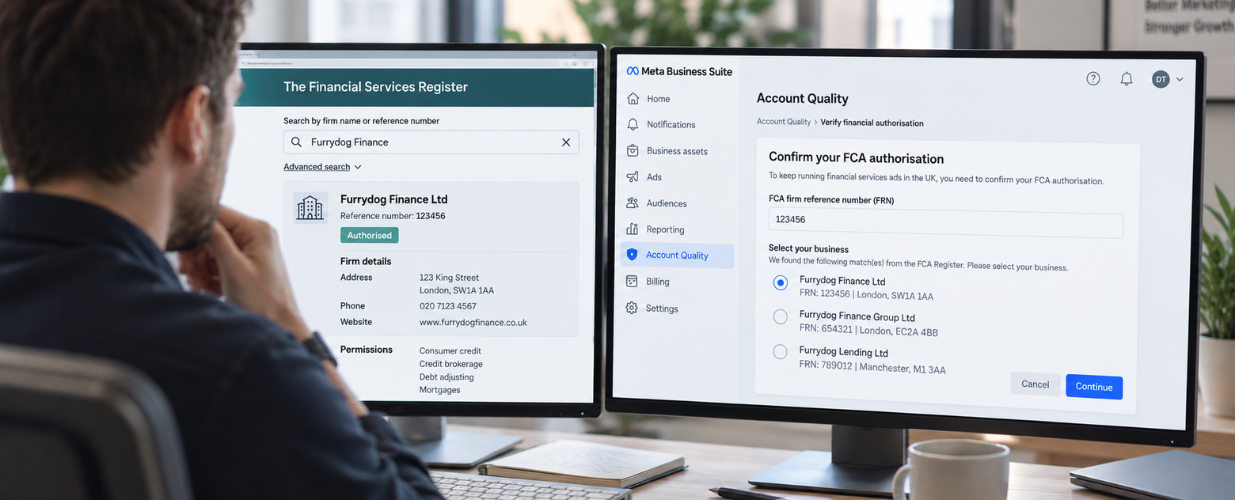
The verification process is not particularly difficult once you know what Meta is looking for, but there are a few places where businesses get stuck. Financial services advertising on Meta can get frustrating very quickly. Your business is legitimate. Your FCA Firm Reference Number is valid. Your compliance team has approved the campaign. Then Meta disapproves the ads anyway.
The important thing to understand is that Meta is not deciding whether your business is FCA authorised. It is trying to confirm that the advertiser running the ads is genuinely connected to the FCA-regulated business it claims to represent.
That is a very different thing.
FCA authorisation and Meta verification are not the same thing
The Financial Conduct Authority regulates financial services businesses in the UK. Meta runs an advertising platform. Being authorised by the FCA therefore does not automatically verify your business inside Meta.
Think of it like this.
| Process | What it establishes |
|---|---|
| FCA authorisation | Whether your business is authorised or registered to conduct particular regulated activities. |
| Meta FCA verification | Whether the advertiser running the financial services ads is connected to the FCA-registered business. |
You can therefore be completely legitimate from an FCA perspective and still have your ads blocked by Meta until verification has been completed.
FCA authorisation tells the regulator who you are. Meta verification is about proving to the advertising platform that you are actually connected to that regulated business.
Why Meta asks financial advertisers to verify
Financial services advertising is a major target for impersonation and fraud. A bad actor can copy:
- A company name
- A website
- A logo
- An FCA number
- An advert
- A legitimate financial brand
Simply putting an FCA Firm Reference Number in an advert therefore proves very little. Meta's verification process adds another layer. It does not just ask for an FCA number. It tries to connect that FCA registration with the actual business, website, email address or telephone number behind the advertiser.
That is why access to your registered contact information matters.
How Meta FCA verification actually works
In practice, the process usually starts after Meta disapproves your financial services ads. You receive a notification telling you that you need to confirm your FCA authorisation to continue advertising. From there, Meta takes you through a five-step process.
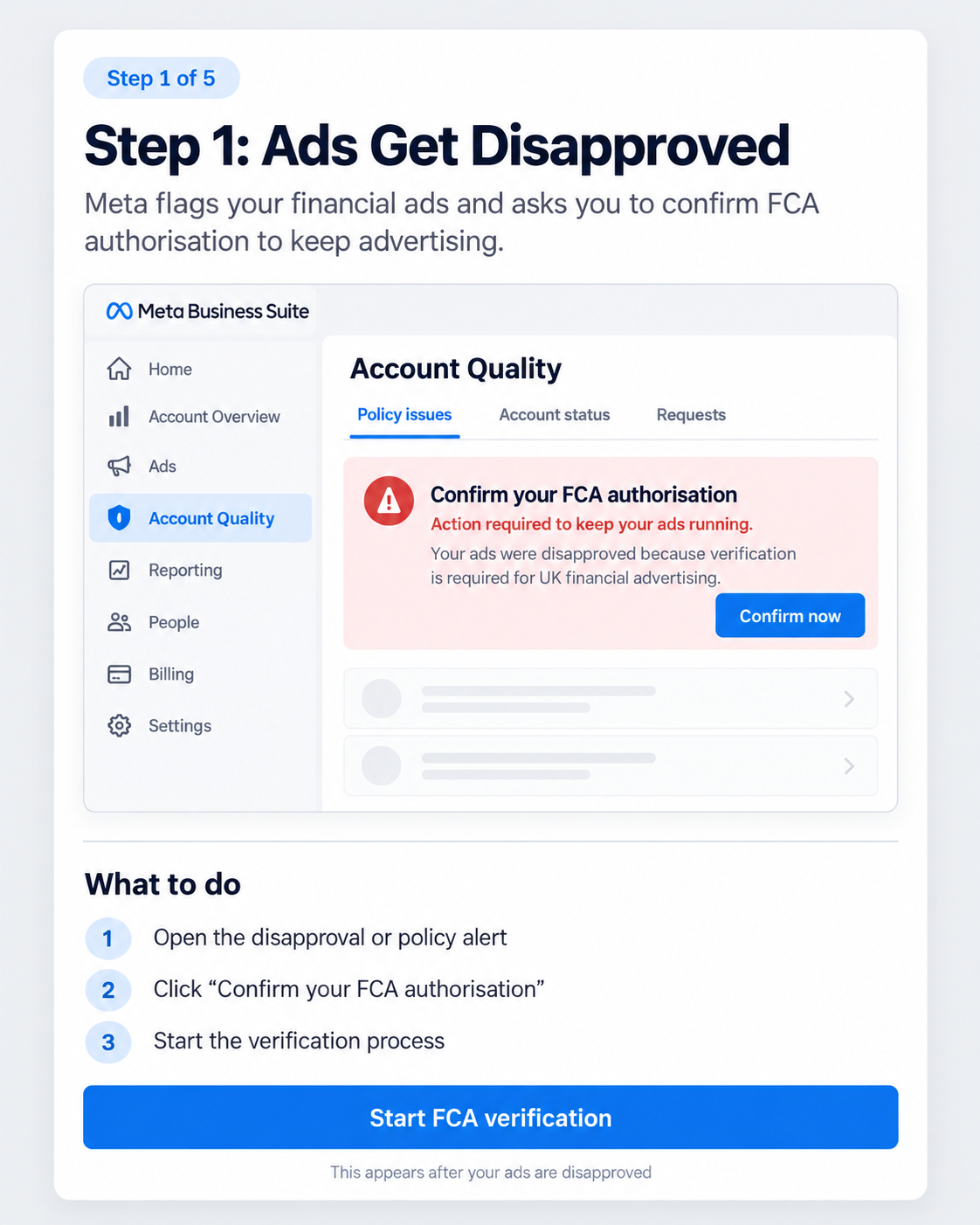
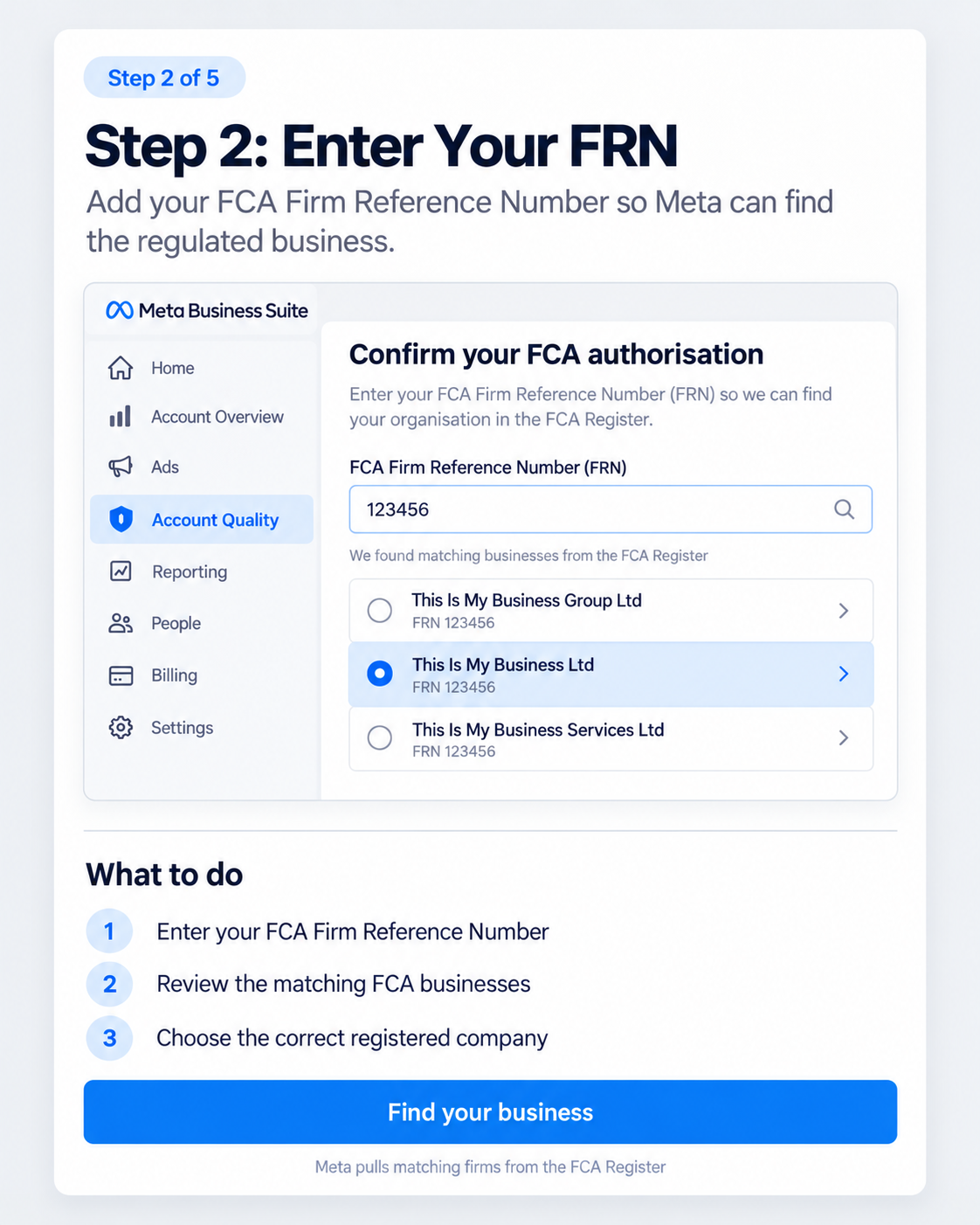
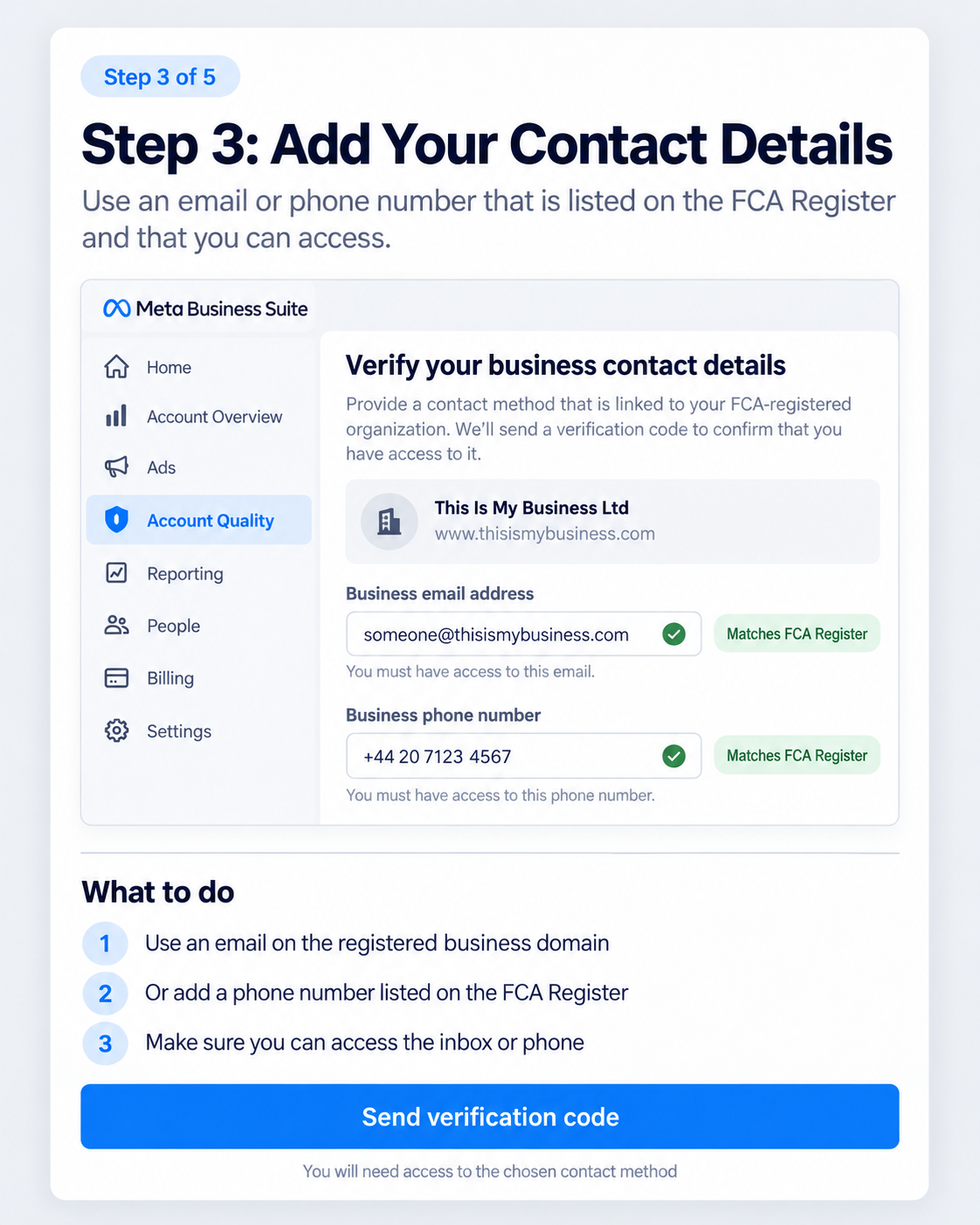
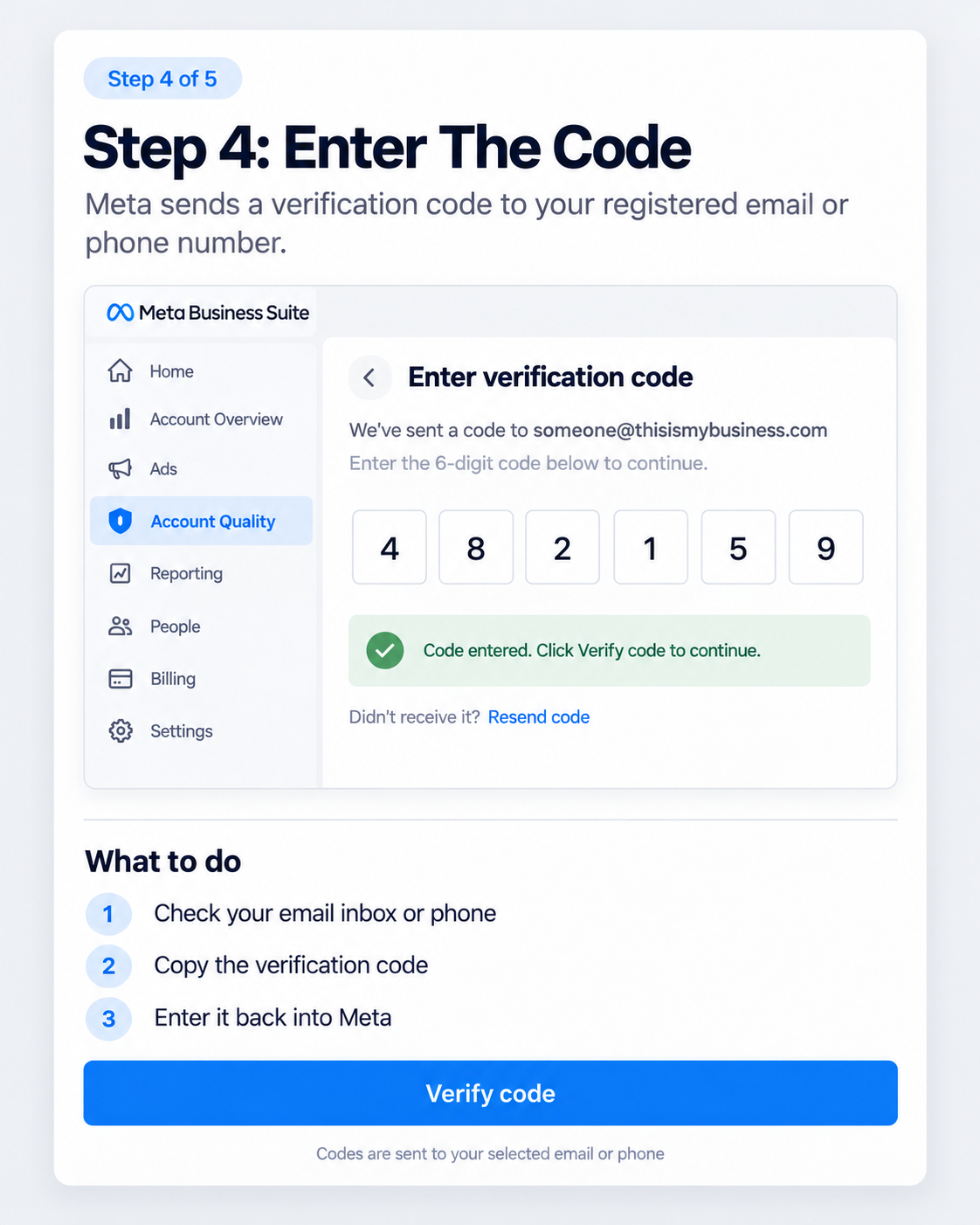
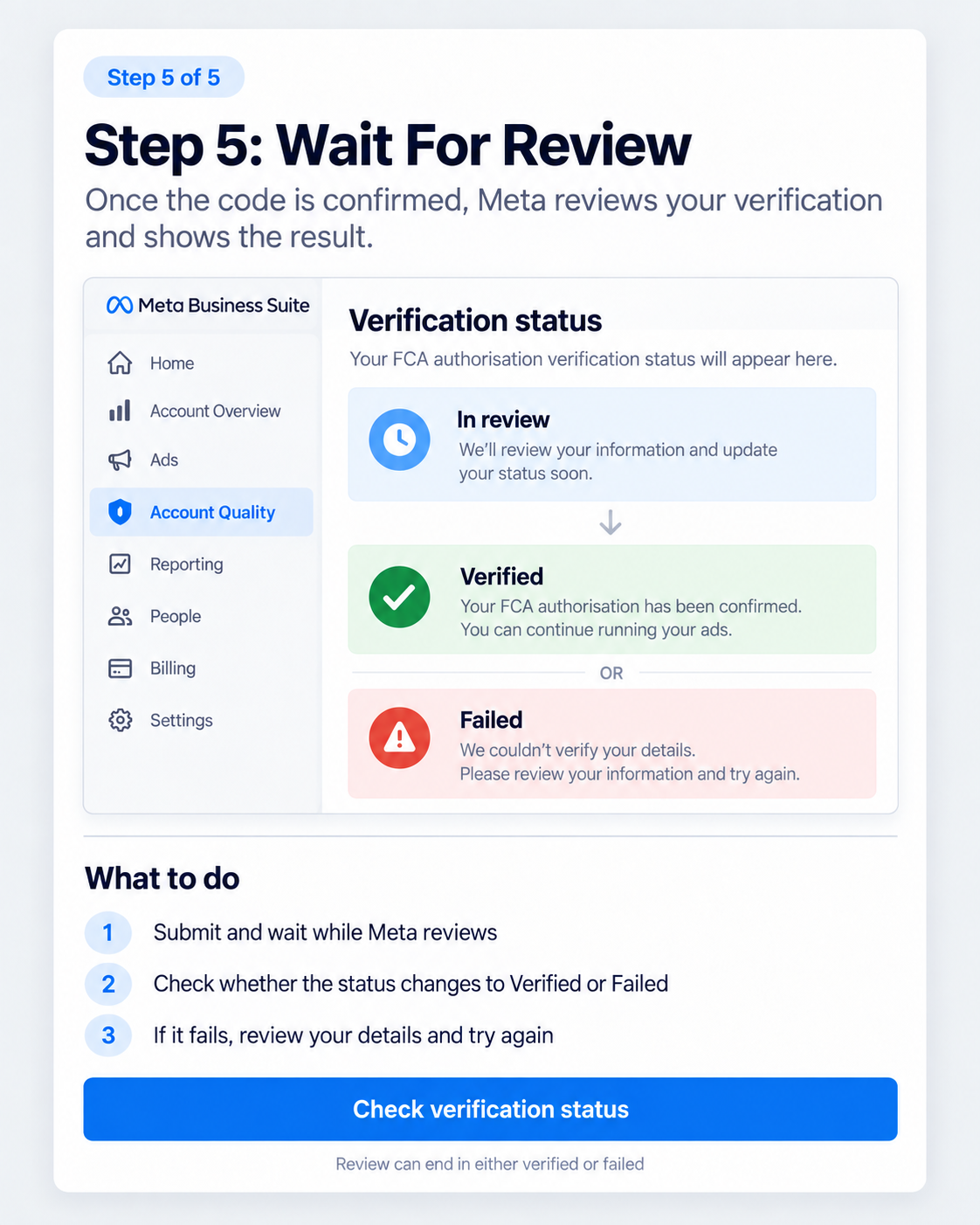
How Meta FCA verification works, step by step. Swipe or use the arrows to move from the initial ad disapproval through to the final verification result.
Step 1: Your ads are disapproved
The first thing you are likely to see is an ad disapproval or account notification. Meta will tell you that FCA verification is required if you want to continue advertising financial services in the UK. Meta sets out the requirement in its own Business Help Centre guidance on verification requirements for financial services advertisers.
The notification normally gives you an option to:
Confirm your FCA authorisation
That starts the verification process.
At this stage, do not immediately start rewriting every advert. If the issue is FCA verification, changing the headline or creative is unlikely to solve it. You need to complete the verification.
Step 2: Enter your FCA Firm Reference Number
Meta will ask for your FCA Firm Reference Number, usually referred to as your FRN. Once you enter the number, Meta searches information from the FCA Register.
This is where the process becomes slightly different from simply typing in your company name. Meta may return a number of similar or related businesses. For example:
- This Is My Business Ltd
- This Is My Business Group Ltd
- This Is My Business Services Ltd
You then need to choose the correct legal business associated with your advertising. That is important. Do not simply select the business whose name looks vaguely familiar. Check the FCA Financial Services Register and make sure you are selecting the correct regulated entity.
This becomes particularly important where businesses operate:
- Multiple trading names
- Several legal entities
- Different brands
- Appointed Representatives
- Parent and subsidiary companies
Step 3: Verify your contact details
Once you have selected the correct business, Meta asks you to prove that you have access to contact information associated with that FCA-registered organisation. This is one of the most important parts of the process.
Email verification
Meta can ask for an email address associated with the business domain. For example, if the business website shown on the FCA Register is www.thisismybusiness.com, an appropriate email might be someone@thisismybusiness.com.
You need access to that inbox. Meta is not simply checking that the email address looks professional. It needs to be able to send you a verification code that you can retrieve.
Telephone verification
You may also be able to use a telephone number associated with the business on the FCA Register. Again, you need access to that phone number. If the number belongs to an old office, former employee or telephone system nobody can access anymore, the verification process can become much harder.
This is why it is worth checking your FCA Register information before you start.
Before beginning verification, make sure somebody in the business can actually access the registered email domain or telephone number. Knowing the details is not enough.
Step 4: Enter the verification code
Once you choose your verification method, Meta sends a code. That might go to:
- The business email address
- The registered telephone number
You then enter that code back into Meta. This proves that you have access to the contact method associated with the regulated business. It is effectively the point where Meta is checking:
You know the FCA details, but can you also prove you control something connected to this business?
Once the code is accepted, the verification application is submitted.
Step 5: Wait for Meta to review the verification
Verification is not necessarily instant. After the code has been accepted, the application can move into review. You will normally then see one of three states.
| Status | What it means |
|---|---|
| In review | Meta is still checking the information. There is usually nothing useful to do at this point other than wait. |
| Verified | Meta has confirmed the FCA authorisation and your connection with the business. You should then be able to continue advertising, assuming the ads themselves comply with Meta's policies. |
| Failed | Meta has been unable to verify the information. Check the information you supplied before attempting the process again. |
Why FCA verification sometimes fails
The business can be completely legitimate and still fail verification. Common problems include the following.
You selected the wrong company
An FRN can return similar company names or related entities. Selecting the wrong one creates a mismatch immediately.
Your email domain does not match
For example, the FCA-listed website might be myfinancecompany.co.uk, but you try to verify using john@gmail.com or an email address belonging to another group company. Meta may struggle to establish the connection.
Nobody can access the registered email
The email may technically be correct, but if nobody can retrieve the verification code, you cannot complete the process.
The FCA telephone number is outdated
This is surprisingly easy to overlook. The number may still belong to the business but route somewhere nobody monitors.
Meta and the FCA Register see different businesses
Imagine this.
| Where it appears | Name shown |
|---|---|
| Facebook Page | Best Mortgage Quotes |
| Website | bestmortgagequotes.co.uk |
| Meta Business Portfolio | ABC Marketing Ltd |
| FCA Register | XYZ Financial Services Ltd |
There may be a completely legitimate relationship between all four. To an automated verification system, however, the setup can look suspicious.
The clearer the relationship between the advertiser and the FCA-regulated entity, the easier verification tends to be.
Appointed Representatives can be more complicated
Appointed Representatives can create another layer of complexity. An AR operates under the responsibility of a principal firm for particular regulated activities. That means you need to understand:
- Which business appears on the FCA Register
- Which FRN should be used
- Who the principal firm is
- Which website is registered
- Which contact details Meta is likely to recognise
- Who is responsible for approving the financial promotion
Do not guess your way through this. If you operate as an Appointed Representative and are unsure which business should be used for verification, speak to your principal firm's compliance team.
Getting Meta to accept an FCA number is not the same thing as getting the regulatory relationship correct.
FCA verification does not mean your ads are compliant
This distinction matters. Passing Meta's FCA verification does not automatically mean Meta will approve every financial services advert you submit. There are two separate layers.
| Layer | What Meta is assessing |
|---|---|
| Advertiser verification | Whether you are genuinely connected to the FCA-regulated business. |
| Advertising compliance | Whether the advert itself meets Meta's policies for financial products and services. |
On the second layer, Meta still evaluates the:
- Advert copy
- Creative
- Landing page
- Financial product
- Claims
- Disclosures
- Risk warnings
- Customer journey
Meta sets out what it allows in its advertising standard for financial products and services. You could therefore be fully FCA verified and still have ads disapproved. Equally, Meta approving an advert does not automatically mean the advert complies with every FCA financial promotion rule that applies to your business.
Your advert still needs to stand on its own
One mistake financial advertisers make is relying on the landing page to fix an aggressive advert. For example:
Cut your monthly payments by £400.
The landing page might later explain that:
- The loan could last longer
- Total interest could increase
- Eligibility criteria apply
- Security may be required
But consumers see the advert first. The advertising message itself still matters. Financial advertising generally requires a more balanced presentation than simply putting every qualification at the bottom of the landing page.
What to check if Meta keeps rejecting your financial ads
If FCA verification has been completed but ads are still being rejected, I would check the account in this order. It is the same sequence we work through on any Facebook and Instagram account handover in a regulated sector.
1. Confirm FCA verification status
Make sure the verification genuinely shows as verified.
2. Check the regulated entity
Confirm that the company selected during verification is the correct business.
3. Check Meta Business ownership
Make sure the Business Portfolio, Page, ad account and website relationship makes sense.
4. Review previous rejection reasons
One disapproval can be random. Twenty ads rejected for the same policy usually indicate a pattern.
5. Review the advertising claims
Look for:
- Guarantees
- Absolute claims
- Unrealistic outcomes
- Unbalanced benefits
- Rate claims
- Missing qualification language
6. Review the landing page
Make sure the website clearly explains:
- Who the customer is dealing with
- What the product is
- Regulatory information
- Relevant warnings
- Material terms
7. Check the entire lead journey
That includes:
- Landing pages
- Lead forms
- Calculators
- Quiz funnels
- Advertorials
- Quote forms
Meta can sometimes identify financial content beyond the advert itself.
Meta verification is mostly about consistency
The easiest FCA verification cases normally have one thing in common. Everything lines up.
- The FCA Register shows one business
- The website belongs to that business
- The email address uses that domain
- The telephone number belongs to the company
- The Meta Business Portfolio clearly represents the advertiser
- The advertising account is connected to the same operation
Problems tend to appear when there are multiple brands, agencies, legal entities, old contact details or unclear ownership structures.
Conclusion
Meta FCA verification is not particularly complicated once you understand what Meta is trying to prove. The process normally looks like this:
Ads disapproved, confirm FCA authorisation, enter FRN, choose your company, provide registered contact details, receive verification code, enter the code, wait for review, verified or failed.
The main thing to prepare beforehand is access. Make sure you know the correct FCA entity and FRN. Make sure you can access an email address associated with the registered business domain or a telephone number listed for the firm. And make sure the business information Meta sees broadly matches the organisation shown on the FCA Register.
If those pieces line up, the process is usually considerably easier. If you would rather work through it with somebody, a paid media consultant can do this alongside your existing team and your compliance function.
Stop guessing why Meta keeps rejecting your financial ads
We audit Meta advertising setups for UK financial services businesses to identify FCA verification problems, advertising policy issues, account restrictions and problems across the advert and landing page journey. If your business is legitimate but Meta keeps blocking your campaigns, repeatedly rewriting the same advert is rarely the best place to start.
This article provides general paid media information and should not be treated as legal or FCA compliance advice. Meta's interface and verification process can also change over time.
You may also be interested in
 Meta Ads agency
Facebook and Instagram campaigns built around qualified enquiries and revenue.
See how we work
Meta Ads agency
Facebook and Instagram campaigns built around qualified enquiries and revenue.
See how we work
 Paid social agency
Paid social across Meta and LinkedIn, including regulated sectors.
See our paid social services
Paid social agency
Paid social across Meta and LinkedIn, including regulated sectors.
See our paid social services
 PPC management
How we build and manage campaigns around profit, not platform metrics.
Read more
PPC management
How we build and manage campaigns around profit, not platform metrics.
Read more